This post covers the installation and configuration setup of Oracle Unified Directory OUD 11G R2 PS3 (11.1.2.3.0)
Please follow the screenshot as below
The blog covers various articles and posts on Cloud, Big Data Analytics, Data Science, Machine Learning, DevOps, Full Stack Development, Java and Middleware Technologies
Showing posts with label OUD. Show all posts
Friday, July 17, 2015
Saturday, May 3, 2014
OAM 11g R2 PS2 (11.1.2.2.0) : Detached Credential Collector (DCC) Setup
This post covers the setting up of Detached Credential Collector (DCC) on OAM using Password Policy Validation Module.
Modify the C:\Oracle\Middleware\Oracle_OAMWebGate1\webgate\ohs\oamsso-bin\login.pl to include the perl path.
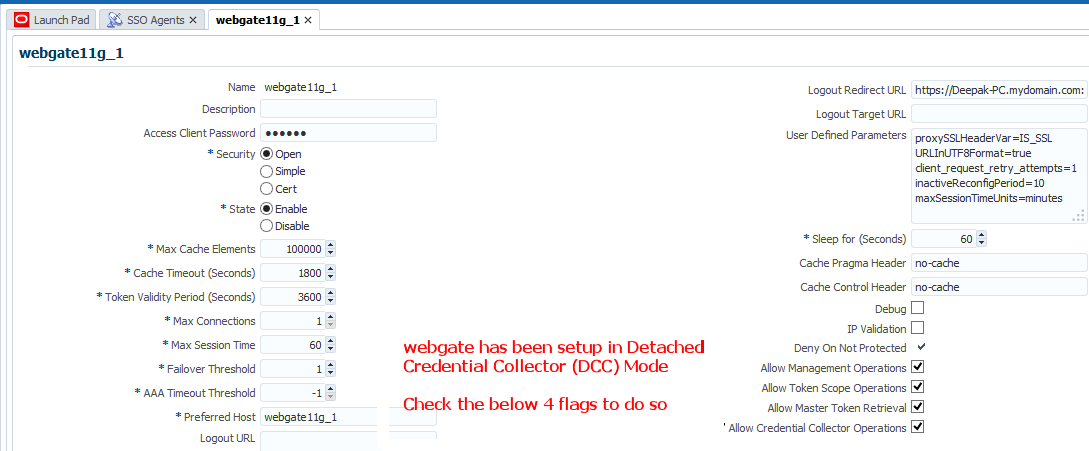
Configure the Web Gate to act as DCC.
Modify the Authentication Scheme
Use the above PasswordPolicyValidationScheme in the Application Domain.
Exclude /favicon.ico and /oamsso-bin/login.pl from protected policy by marking them as excluded.
Modify the default password policy to include the password service URL to /oamsso-bin/login.pl
Try to access the resource
You will be redirected to
If you get the below error
On the oam_server1 console, error message is
It means that your backend directory schema is not extended with the password policy object class and its contained attributes.
Import the schema file in OUD.
Schema file is located at C:\Oracle\Middleware\Oracle_IDM1\modules\oracle.idm.ipf_11.1.2\scripts\ldap\OUD_OblixSchema.ldif
There are schema files according to the Directory Server type at the same location.
After loading the schema , modify the test user in question with the oblixPersonPwdPolicy object class
Now retest the by accessing the protected resource
Issue resolved. Successful Authentication
Modify the C:\Oracle\Middleware\Oracle_OAMWebGate1\webgate\ohs\oamsso-bin\login.pl to include the perl path.
Configure the Web Gate to act as DCC.

Modify the Authentication Scheme
Use the above PasswordPolicyValidationScheme in the Application Domain.
Exclude /favicon.ico and /oamsso-bin/login.pl from protected policy by marking them as excluded.
Modify the default password policy to include the password service URL to /oamsso-bin/login.pl
Try to access the resource
You will be redirected to
If you get the below error
On the oam_server1 console, error message is
It means that your backend directory schema is not extended with the password policy object class and its contained attributes.
Import the schema file in OUD.
Schema file is located at C:\Oracle\Middleware\Oracle_IDM1\modules\oracle.idm.ipf_11.1.2\scripts\ldap\OUD_OblixSchema.ldif
There are schema files according to the Directory Server type at the same location.
After loading the schema , modify the test user in question with the oblixPersonPwdPolicy object class
Now retest the by accessing the protected resource
Issue resolved. Successful Authentication
Monday, April 21, 2014
Oracle Unified Directory (OUD) 11G R2 PS2 (11.1.2.2.0) Configuration Setup
Launch oud-setup.cmd or (.sh) from OUD_HOME
Labels:
OUD
Subscribe to:
Posts (Atom)


